Charlotte Matthew: A Script Font for Web Design
When I was redesigning a boutique online store’s homepage, I knew the font had to do more than just look good—it needed to feel right. The brand was all about elegance and creativity, and I wanted a typeface that could bring that energy to life without sacrificing clarity. That’s when I discovered Charlotte Matthew, a fancy script font with a personality that stood out in a digital space.
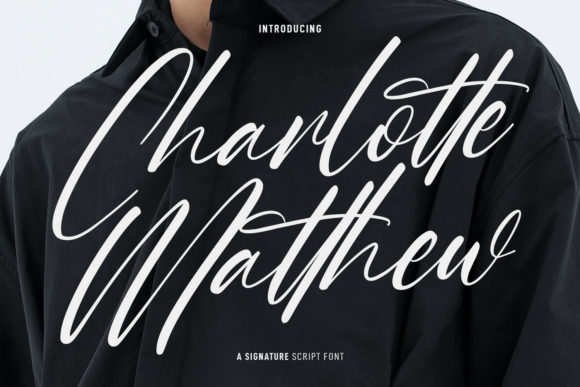
Charlotte Matthew isn’t just another script font. It has medium contrast strokes, which gives it a balanced feel—neither too bold nor too delicate. The characters are fun and expressive, with ligatures that add a touch of sophistication. It’s perfect for headers, logos, and short phrases where visual flair matters, but it still maintains enough structure to work well in a web layout.
Testing Charlotte Matthew in a Real Layout
I started by testing it in the hero section of the website. The large headline needed to grab attention, and Charlotte Matthew delivered. Its flowing curves and unique alternates gave the text a handcrafted, personal feel. But I also noticed something important—readability. On smaller screens, some of the more intricate details could get lost, especially if the text was too small or placed over a busy background.
That led me to think about how to use the font strategically. I decided to reserve Charlotte Matthew for larger, prominent elements like the main heading, CTA buttons, and logo text. For body copy and secondary text, I paired it with a clean sans serif font to maintain balance and ensure the site remained easy to navigate.
Charlotte Matthew in Different Web Projects
Whether it’s a creative portfolio, a coaching website, or a product landing page, Charlotte Matthew can elevate the design. I’ve used it on a course sales page to make the headline stand out, and it worked beautifully. The font added a sense of luxury and professionalism without feeling overwhelming.
In a blog redesign, I used it for the header and featured post titles. The result was a more engaging, visually cohesive experience. It helped create a clear visual hierarchy, guiding readers through the content while maintaining an elegant aesthetic.
For a digital brand kit, Charlotte Matthew became the go-to font for logos and social media graphics. Its versatility made it easy to adapt across different platforms, from website banners to email newsletters. The alternates and ligatures allowed for subtle variations that kept the design fresh and dynamic.
Readability and User Experience
One of the most important considerations when using a script font like Charlotte Matthew is readability. On mobile screens, it’s crucial to keep the font size large enough so that users don’t have to strain to read. I found that using it for headings and short phrases worked best, while avoiding long blocks of text.
When placing it over image banners or dark backgrounds, I adjusted the color and spacing to ensure legibility. Lighter weights and careful kerning helped prevent the text from blending into the background. For buttons and CTA elements, I used a slightly bolder version of the font to make it pop without being distracting.
Pairing Charlotte Matthew with Other Fonts
Font pairing is key to a successful web design. Charlotte Matthew pairs well with simple, modern fonts that provide contrast. I often pair it with a sans serif for body copy, creating a clean and professional look. This combination keeps the design from feeling too ornate while still allowing the script font to shine where it matters most.
For editorial-style websites, I’ve used it alongside a serif font to give the layout a more traditional, refined feel. It works especially well for blogs, magazines, and content-heavy sites where a mix of style and readability is essential.
Practical Tips for Using Charlotte Matthew
Before implementing Charlotte Matthew on any project, I always check the available styles, weights, and file formats. It’s important to ensure the font is optimized for web use and includes the necessary alternates and ligatures for a polished look.
Multi-language support is another factor to consider. If the website targets international audiences, I verify that the font supports the required languages and character sets. Commercial licensing is also a must—especially when working on client projects or online stores.
Overall, Charlotte Matthew is a versatile and stylish choice for web designers looking to add a touch of elegance to their layouts. Whether it’s for a creative portfolio, a coaching website, or a product landing page, it brings a unique energy that can enhance the overall user experience.
As I continue to explore new ways to use it, I’m reminded that great typography isn’t just about aesthetics—it’s about making the design work better for the user. And in that regard, Charlotte Matthew has proven to be a valuable asset in my toolkit.